Icon of program: Windows Defender Offline

Windows Defender Offline

  • Free
  • 3.8
    237
  • 146.9K
  • V4.4.304.0
Free Download for Windows

View an ad to download for free

A deeper scan when malware digs in

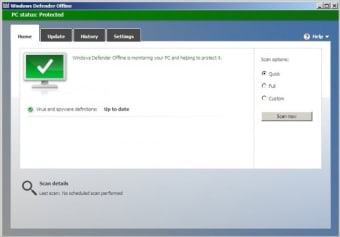
Windows Defender Offline, by Microsoft, is a specialized malware removal tool for persistent threats that can interfere with regular antivirus scans. It restarts the PC into a trusted recovery environment before checking for suspicious files and boot-level malware outside the normal Windows session. The tool suits users, technicians, and administrators who need an extra cleanup step after a serious security alert or suspected infection.

Top Recommended Alternative

When Windows steps out of the way

The scan runs outside the standard Windows environment, giving persistent malware less opportunity to hide, block, or disrupt the security process. This setup lets Microsoft Defender Offline inspect files and system areas that remain active or protected during a normal session. That deeper access is a key advantage for checking rootkits and malware linked to the master boot record after standard protection raises concerns.

Built for stubborn threats, not daily scans

Windows Defender Offline focuses on serious infections that can survive or interfere with normal antivirus activity. It works as an escalation tool when a regular scan finds a persistent threat or when a PC shows signs of deeper compromise. This focused role is useful for cleanup, although it is not a replacement for real-time protection, scheduled scans, or keeping Microsoft Defender Antivirus updated.

A reboot is part of the deal

Running an offline scan requires administrator access and restarts the PC before the scan begins. Microsoft estimates that the process takes about 15 minutes, although timing varies with the device and storage setup. Windows Recovery Environment must also be enabled. BitLocker-protected devices need extra attention because users can need to suspend BitLocker first or enter a recovery key after the restart.

Built into Windows, with an older rescue route

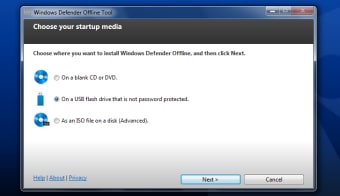
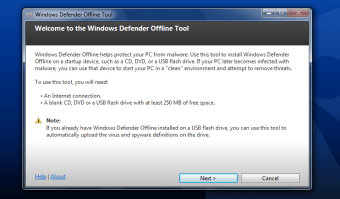
On current Windows systems, the scan is available through Windows Security, making it easier to start without installing a separate security program. Scan results appear in Protection history after the device returns to normal operation. Older Windows 7 SP1 and Windows 8.1 systems use separately created USB, CD, or DVD recovery media, which adds setup work before the scan can begin.

A useful fallback when normal scans are not enough

Windows Defender Offline is a practical offline malware scan for users facing suspicious or persistent threats. Its pre-boot environment gives it a clear purpose beyond ordinary antivirus checks, while its restart requirement keeps it from being a casual everyday tool. It is most valuable as a targeted security measure when Microsoft Defender needs a cleaner view of a system than an active Windows session can provide.


  • Pros

    • Scans outside the active Windows session for deeper malware checks
    • Helps inspect rootkits and master-boot-record-related threats
  • Cons

    • Requires administrator access and a full system restart
    • BitLocker protection and older systems can add setup steps
 0/3

App specs

  • Developer

  • License

    Free

  • Version

    4.4.304.0

  • Latest update

  • Platform

    Windows

  • OS

    Windows 7

  • Language

    English

  • Downloads

    146.9K

    Last month's downloads

    • 167
  • Size

    860.18 KB

Program available in other languages


Icon of program: Windows Defender Offline

Windows Defender Offline

  • Free
  • 3.8
    237
  • 146.9K
  • V4.4.304.0
Free Download for PC

View an ad to download for free


User reviews about Windows Defender Offline

3.8

3 reviews

Add review

Main reviews for you

  • Anonymous user

    Fantastic as a startup disk, works great.. This is a great tool for locating unwanted malware, Trojans, etc. I have used it and it works great. I use this on a startup disk so nothing else is loaded on the computer.

  • Anonymous user

    Windows Defender Offline needs some instructions.. I know the software is in Beta but information about how it works and how to run it would be nice.
  • Anonymous user

    Awesome product, worked when nothing else would. Highly recommend.. My system suggested that I download and install this program because of a virus I couldn't get rid or. The virus was a tricky bugger. Win defender was easy to download and I downloaded to a usb. Restarted the computer from the usb and it immediately went to work at fixing my computer offline. Problem solved, no more issues.. I would recommend any time. Pros: ease of use

More

You may also like

Alternatives to Windows Defender Offline

Explore Apps

Latest articles

Laws concerning the use of this software vary from country to country. We do not encourage or condone the use of this program if it is in violation of these laws.
Softonic

Is Windows Defender Offline safe?

100/100

Score result: Clean

This file passed a comprehensive security scan using VirusTotal technology. It is safe to download.

  • Virus free
  • Spyware free
  • Malware free
  • Verified by Security Partners

    VirusTotal logo

Scan Info

Last scan
Friday, November 17, 2023
Scan provider
VirusTotal · Full report

File Integrity

File
mssstool32.exe
SHA256
436deb56515e77af63f8b375e81d86871d2728b1f9afea16c2f44a2a214fc219
SHA1
25f9a1991cd45fd3203af95b34a7ac2f79848c50

Softonic security commitment

Windows Defender Offline has been thoroughly scanned by our advanced security systems and verified by industry-leading partners. This file comes from the official developer and has passed all our security checks, showing no signs of viruses, malware, or spyware. For more information, visit our Security and Trust Center

Signed in to Softonic as